ZURB Office 3D VideoNate Bolt 3D Video
It came about like this: we were walking down to get coffee and discussing the finer points of Nate Bolt's SHOTS video. Nate was coming to the office to do a Soapbox and we decided two dimensions weren't enough to fully capture him, so we set about to build our own 3D camera. It was a huge success and much easier then you would think. Here is our process in three easy steps, so that you can follow along at home.
Step 1: Acquire two identical video cameras
Everyone at ZURB got an iPod Nano at the holiday party last year and two happened to be in the office on Friday, score! Attach the cameras to a fixed surface about 6-7 inches apart. I found a piece of metal and a couple rubber bands that did the trick.
You need to have the cameras pretty level with each other (think how your eyes work) but don't sweat getting them perfectly aligned, your going to fix that in step two.
Step 2: Record video from both cameras
In case this is not obvious; you're going to record from both cameras at the same time. However you don't need to start both camera at exactly the same time since we can easily sync them when we do the editing. Which brings us to the tricky part...
The end format we need is a single video file that has both sources side by side. A little Googling found a Windows app called StereoMovie Maker that will help you combine, sync and align the two videos. It's not the most intuitive software so here is the workflow we developed:
Transcode your video files to MPEG-1 or MPEG-2 (StereoMovie Maker only supports these formats).
Click File -> Open Left / Right /Movies...
Select your two video files.
Use the arrows at the bottom of the screen to sync the timing of the two videos.
Click Adjust -> Easy Adjustment to open the adjustment window.
Focus on something distinct in the background (like the power outlet in this example) and using the horizontal and vertical sliders align the red and blue images so they completely overlap
Click File -> Save Stereo Movie.
Make sure you select the Side-by-side option.
Select the Microsoft Video 1 compressor. YouTube has no problem reading this format and it is significantly smaller then using no compression.
If you did this all correctly then your saved video should look like this, both videos sources side by side in a single file:
Step 3: Upload to YouTube
Upload the video to YouTube and add the tag yt3d:enable=true. This tells YouTube to combine your two side by side videos into a single 3D video.
That's it; once YouTube has finished processing the video you can go to its YouTube page and test it out with your Red / Cyan glasses. If have Amber / Blue or Green / Magenta Glasses you can use those instead by toggling the 3D options next to the pop out button in the lower right hand corner of the player.
Note that embedded YouTube videos do not support 3D, you must go to the YouTube video page for this feature.
Here are the two videos we made on Friday with this setup:
ZURB Office 3D VideoNate Bolt 3D Video
Do you want to work for a company that does awesome things like building 3D cameras from scratch? Check out our talent page and show us what you got.
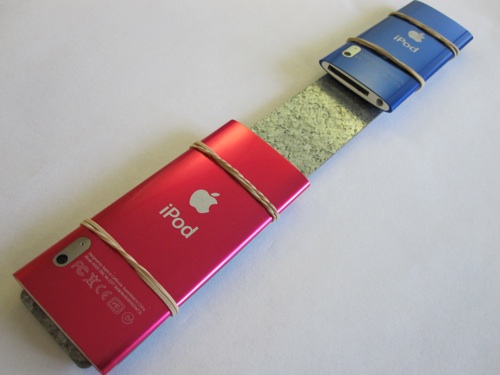 ZURBvision: A 3D camera built from two iPod Nanos