How Influencers Manage Their Email

in by Dmitry 14 comments

The Q&A series is where we ask influencers and friends of ZURB for their opinions. This week we are turning to productivity and asking folks about how they manage email.

Chris Sacca once said: "Email is a task list created for you by someone else." Robert Scoble once pointed out: "Remember: the more email you send out the more you'll get back!" Most of us fall victim to the insane amount of email we get every day. We need to check in and respond to most of our incoming email. Some of us treat it as a task list, others of us try to check in with it every few hours. We are addicted to email. A lot of the time email gets in the way of our day as we accomplish less and less by answering more and more email. We turned to the influencers (the folks who really have tons of email) to ask how they manage email.

Question: How do you manage email?

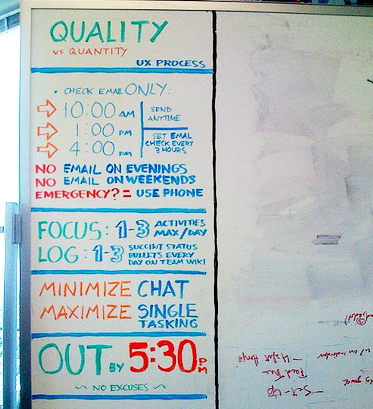
I try to do this (see the image). Just to clarify, this was given to me by a friend, I didn't make it myself, but I do try to follow it.

Caterina Fake, Co-Founder of Flickr
I try to only check it a few times a day but I'll be first to admit I'm not disciplined enough. The best thing to do with email is turn it off for a few hours every day so you don't even have it close or accessible. I've started using a program called Concentrate that actually lets you enter an activity state and block access to things like email, IM, etc.


Though I respond to most emails I mentally think of replying to email as optional which changes your perception of the task. Think of how many times you hear - "I have to check my email". Really? You have to check it? Unless your last name is Obama you probably don't have to check your email... and even he could probably use a few time outs.

-Ben Blumenfeld, Communication Design Manager at Facebook


I loathe email. Unfortunately it's still the primary means of most business communication over 140 characters. I used to try and keep my inbox below 50 items as regularly as possible. Now I get to email when I can, even if that means a swelling inbox. It's just not worth it to me anymore to devote significant chunks of my day to managing email.

-Cameron Moll, Founder of Authentic Jobs, Designer, Author, Speaker


My email is a to do list that anyone and everyone piles on. And then they get mad when I don't do the random list of "have-tos" that they sent me. I check in about twice per day, but it takes forever for me to get out of it. I just get 100 emails per day from people who I care about but don't have time to respond to. The single most frustrating part of my day is email. I'm desperate for a solution.

-Andrew Warner, Founder of Mixergy.com


I check e-mail a few times an hour and have a separate task list I keep for my day-to-day. I don't really organize my e-mail beyond that.

-Julie Zhuo, Product Design Manager at Facebook


Curious to hear from you. How do you manage your email?

14 comments

Josh Jacobson says

Great post, thank you. I'm also reading "The Power of Less" and the image that Caterina shared is an excellent visual summary of the email chapter.

As product manager at Xobni, I've spent a ton of time researching email habits and have witnessed such a wide range of styles. People who use Xobni tend to spend less time filing things because they can just trust that if they really need to find something, they can search for it and get it quickly. This definitely helps reduce the stress of "dealing" with each and every message as it comes in.

Now, I must go back to focus on my 3 tasks for the day :)


Dmitry (ZURB) says

@Josh Haha - yes, focusing on a few tasks vs. email usually works great for me to make sure and get at least a few really important things done. I try to take Tim Ferriss's advice and stick to checking email twice a day. (still trying). :)

Have not heard of Xobni before. We use Gmail here and the search is pretty good. Curious to hear - do you archive the emails and keep to inbox zero with Xobni? Or do you just leave all the email in the inbox?


Victor Haze says

I use a combination of GTD and Xobni that works great. The picture says it all. MIT (Most Important Tasks) everyday 3-4 max. Plan with GTD on various levels of focus.From runway to 50K feet view. Use email as To-Do by switching it into Tasks and monitor those on at least a weekly review level to keep you current, clear and concentrated on the things ahead. And use Xobni when all else fails ;-)


Eric Miller says

Google's priority inbox has actually been a great help for me in managing email. Since I have the habit of leaving items unread that I need to deal with, those emails no longer get lost in the mix with other messages since priority inbox keeps them up top. It has also already learned to keep certain less important messages below the fold.

I also use Highrise to manage email and tasks... you can forward an email to Highrise and it automatically creates a note associated with the person. You can also email tasks to Highrise and it creates a to-do. This allows me to file an email just by forwarding it, and it's out of my inbox.


Daniel Nicolas says

I have filters set up in gmail that auto tag things. Once a week, I'll go through and setup new filters, but after the first few weeks, I have pretty much caught everything that comes into the inbox.

Some emails get auto-archived. Some emails get auto-marked as read, but stay in the inbox. I keep only active emails in the inbox. If I need something later, I search for it.

I consider email the modern equivalent of a long form letter sent in post. It doesn't require an immediate response, unless the content is time sensitive. Gmail's priority inbox & filters is a huge help here, as you can make sure you don't miss important emails from your family but the chain letter forwards from that crazy aunt of yours get auto-filtered as bacn.

I have instant message programs running the whole time i'm online, and my basic calls and texts only phone on or near my person pretty much 24/7, so if people want to communicate in faster timeframe, that's the way to do it.

I still like getting a letter in the post though :D


Joe says

I love the concepts of Merlin Mann's Inbox Zero and I use that philosophy every day. I think it helps to make email less of a dirty word. When I hear or read the term "managing" email, it conjures up something that is just not fun. By simply applying a new mindset of "processing" email, I think you begin to feel like you're getting somewhere each day. Now, I feel more empowered than ever to process an email right away. For those familiar with Inbox Zero, you'll know that "process" can be a variety of things. Anyway, it's worth checking out.


Dmitry (ZURB) says

@Eric - Nice tips. Priority inbox does seem to help solve some of the headaches with email from what some of my friends say. Haven't tried it myself. Highrise is an interesting way to manage email action items. Do you find it hard to manage email and Highrise at the same time?


Dmitry (ZURB) says

@Daniel - Interesting! So you setup new filter every week? How many filters do you have now? Ever feel like you have too many filters and labels? Do you have filters to determine whether the content in the email is time sensitive?


Dmitry (ZURB) says

@Joe - I too love Inbox Zero. Try to stick to it every day. One problem with it is that I feel like email has the control over my day since I'm trying to get to inbox zero. Filtering works, but then you forget to get to some of the important stuff. Hence I've turned to a task list now. I go through my day based on a task list and try to check in with email just a few times a day. Do you find that Inbox Zero philosophy controls your day?


Satya says

Attention is beyond being a commodity, it's the most valuable distinct tool you can apply for human evolution, starting with yourself. This is why i just unsubscribed from about 50 lists i was on.

Just remove your contact info from the public and setup an autoresponder if you want. Direct people to twitter. There's no obligation to respond to every email. The most essential contacts and messages will find their way to you.


Eric Miller says

@Dmitry Not really, because I try put emails into (or forward to) Highrise right away, so that's really the only system I use to track/manage things. Once it's in Highrise and there's a task related to it, I can forget about the email.


Jim Sewell says

Something that works well for me is, while using a Mac, have growl speak the title of incoming emails. This way I can ignore the fluff but jump on something important if it comes in without wasting time checking 50 times a day or running to check what that "ding" was when it turns out to be spam. I'm always listening to music in my headphones anyway so it's not a distraction to others to have "Enlarge your..." spoken out loud. :)


Dmitry (ZURB) says

@Jim Interesting way to filter through the emails, must get annoying to have the computer speak the title of the emails to you all the time? No? I get around 50 emails a day, would be a bit wild to have that on all the time.